Shein Free Trial Workflow: Criteria, Stages and Status
Shein Free Trial Center workflow analyzed: catalog segments, application stages, status checks, review criteria and Rewrite handling.
Advertisement
Free Trial Center basics: users can apply for products listed in specific campaigns. Choosing an item and submitting it is only step one; the workflow has several further stages.
Catalog Segments









Product mix and campaign timing: both set by the program supplier.
Program entry and approval are separate outcomes.
All requests are submitted and evaluated within Shein's own platform; selection decisions belong exclusively to Shein. Selection triggers further obligations: test the product and publish a review within the set window.
Obsirex provides information only and is not affiliated with Shein. It does not collect personal data, process requests or influence outcomes. Mapping every checkpoint in advance lowers the risk of expired deadlines and similar faults.
Step 1: locate the trials area
Log in, then go to the Free Trial Center. App route: Profile → More Services → Other Services → Free Trial Center. That screen displays every product tied to a live campaign.
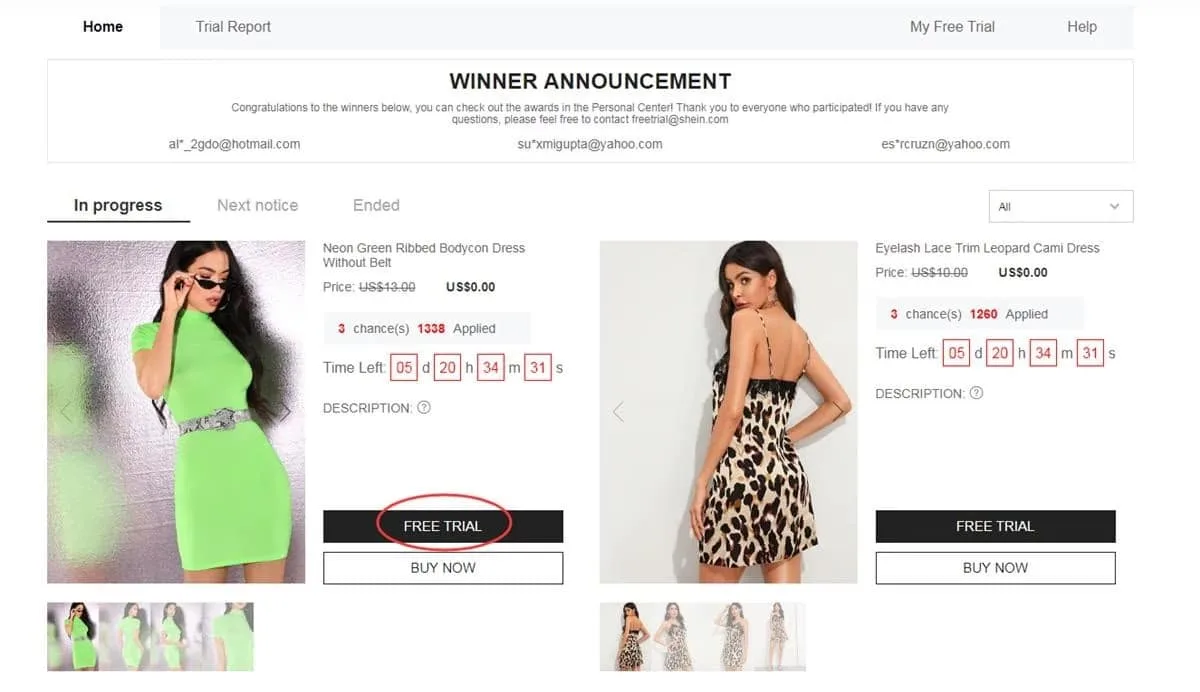
Entry point: the area listing campaigns that currently accept requests
Step 2: choose test items
Weekly limit: 3 applications. Unused slots expire at cycle end; nothing carries forward. Pre-selection criteria: correct size, plus a registered address inside the region your store serves.
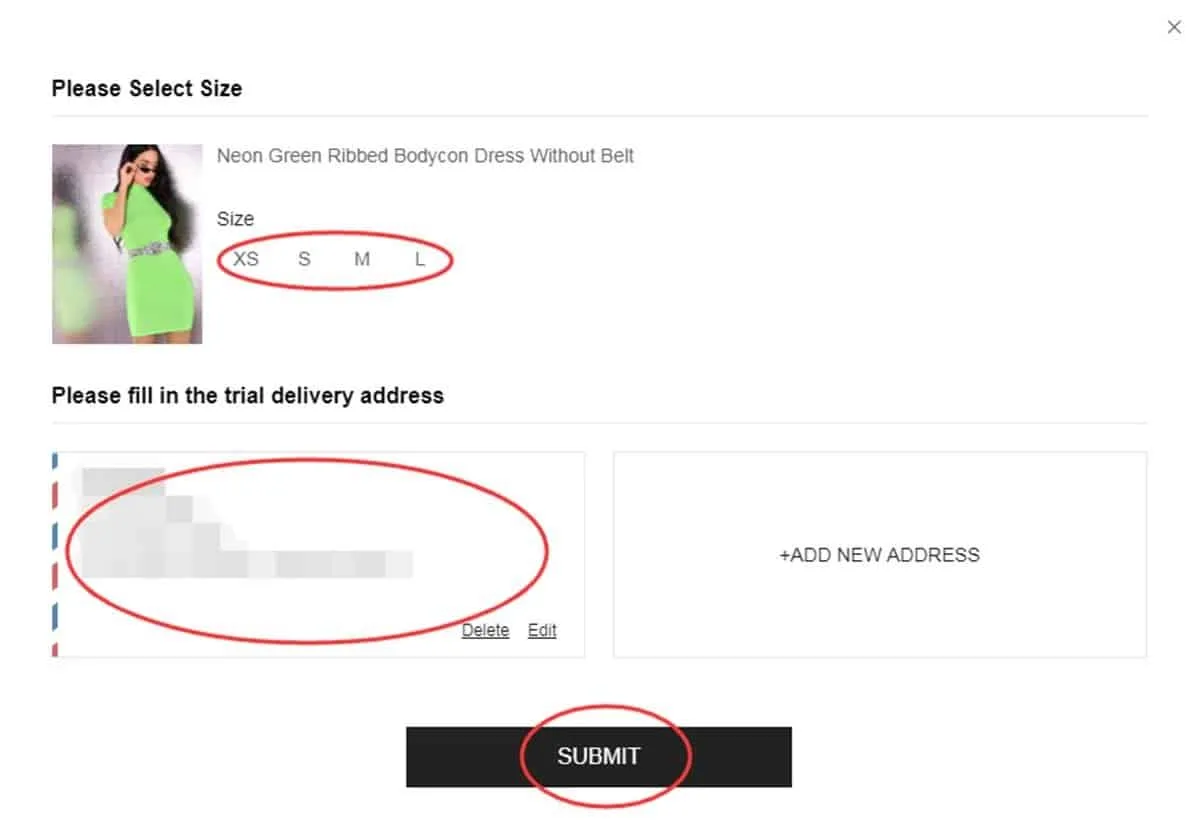
Validate item choice and shipping details prior to submission
Step 3: track request status
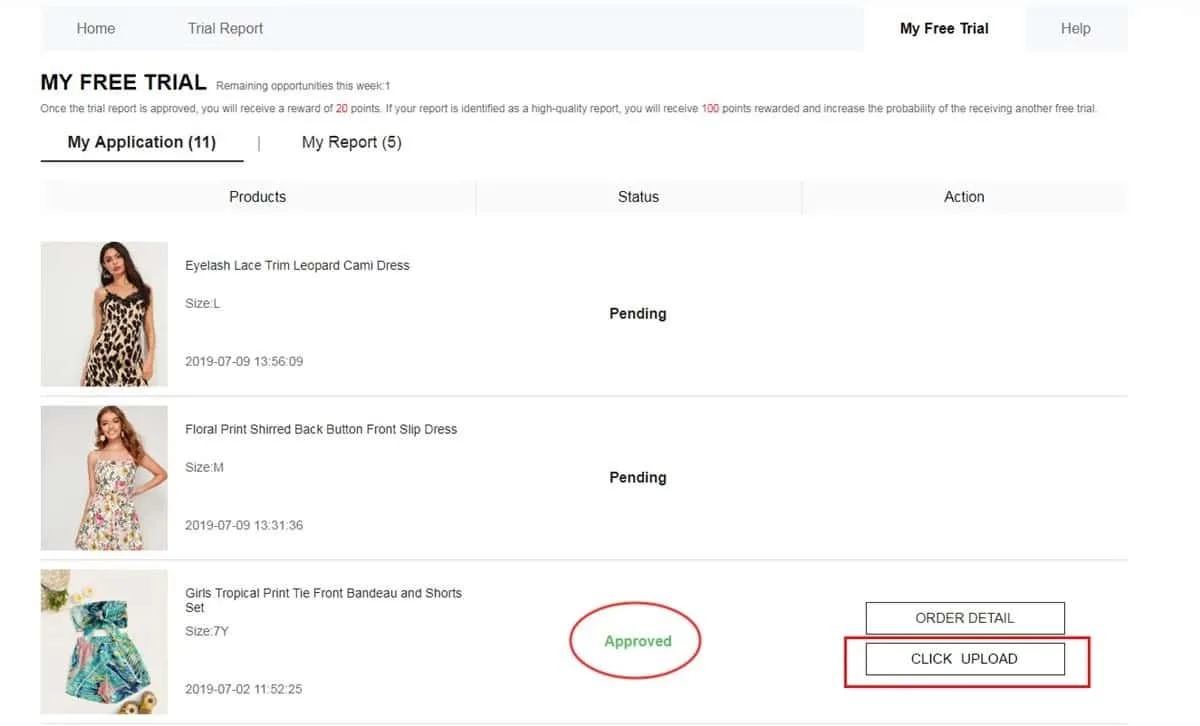
Tracking: requests appear under “My Free Trial” or “My Applications”. Typical turnaround: about one week. Status “Approved” = selected for that trial; status “Failed” = not chosen in this round.
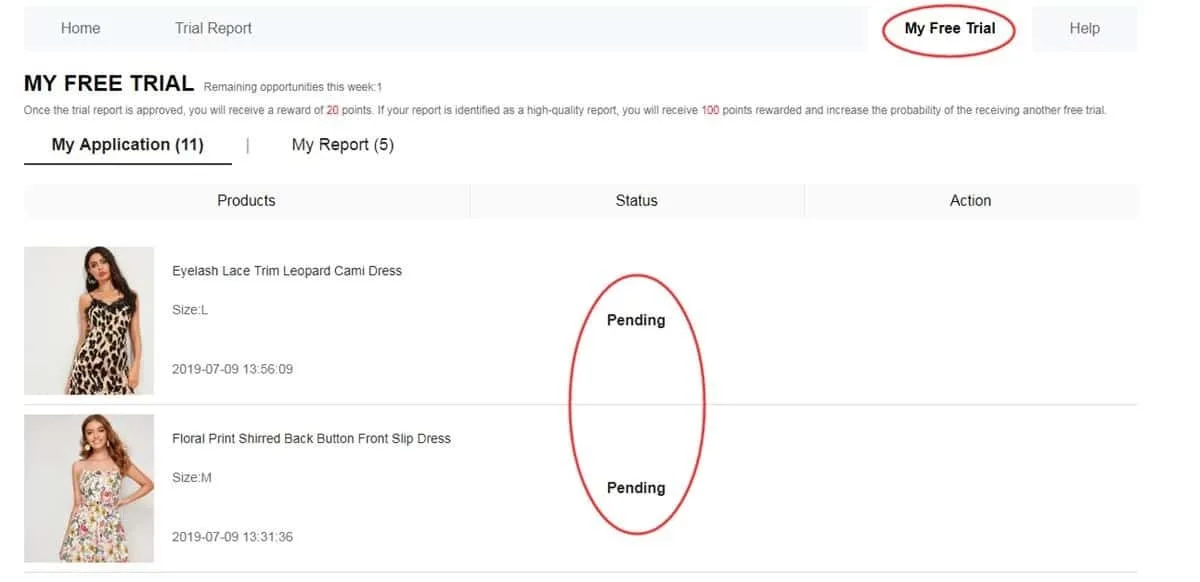
History view: shows which requests progressed
Step 4: test the delivered product
Delivery received: put the item to real use before writing anything. Criteria to assess: material, finish, comfort, size, appearance, overall quality. Requirements: genuine usage, original photos, submission within the 10-day maximum window.
Publish a detailed review backed by original photos
Step 5: verify report acceptance
Outcome check: My Report displays the result after submission. Standard credit for an approved report: 20 points. A “High-Quality Report” rating can add a further 100 points. Note: the bonus carries no automatic approval in subsequent campaigns.
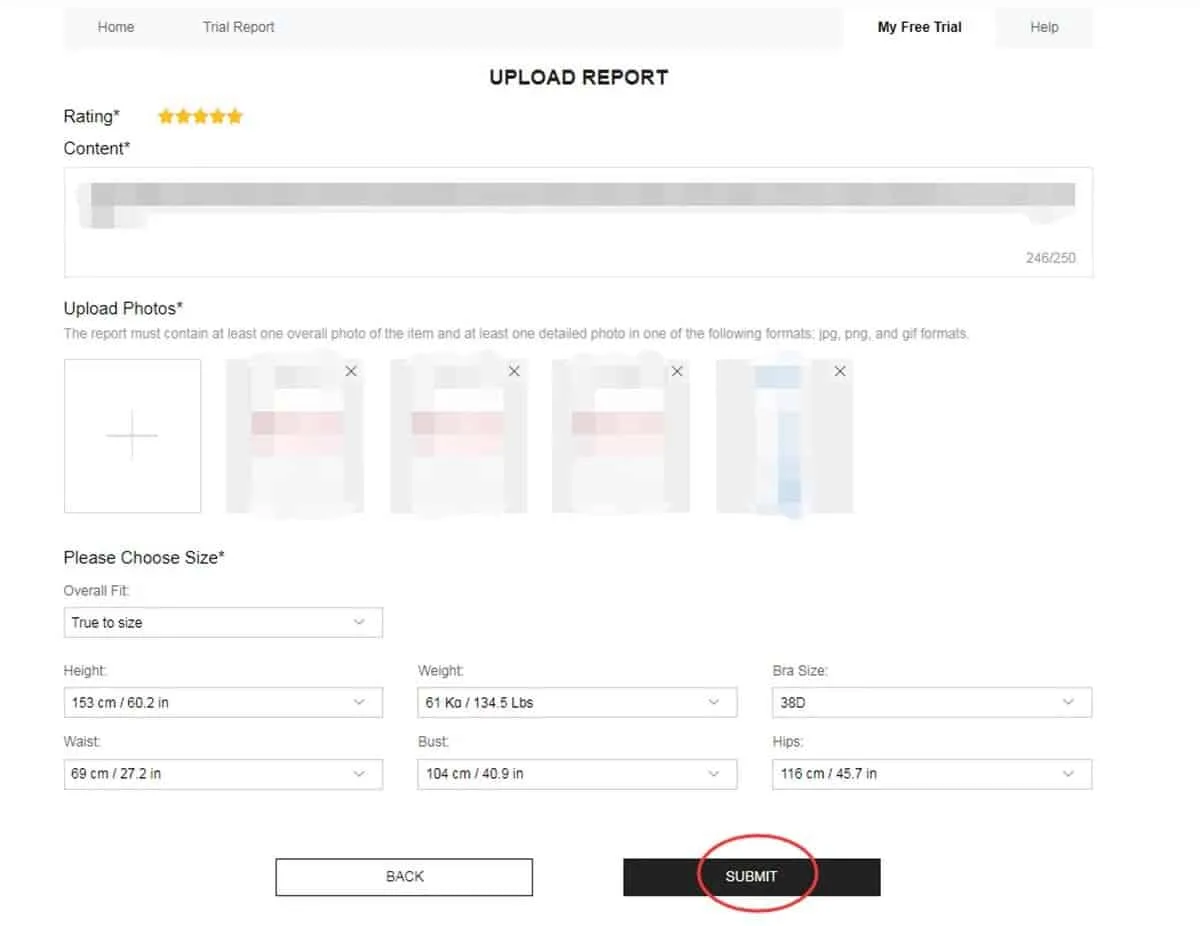
Result panel: evaluation outcome plus the points credited for the review
Step 6: revise when the process allows
First-pass evaluation can reject a review. Status Failed: check for a visible Rewrite option. If present, rework the text, expand on relevant details and replace any image that is dim, out of focus or obscures the product.
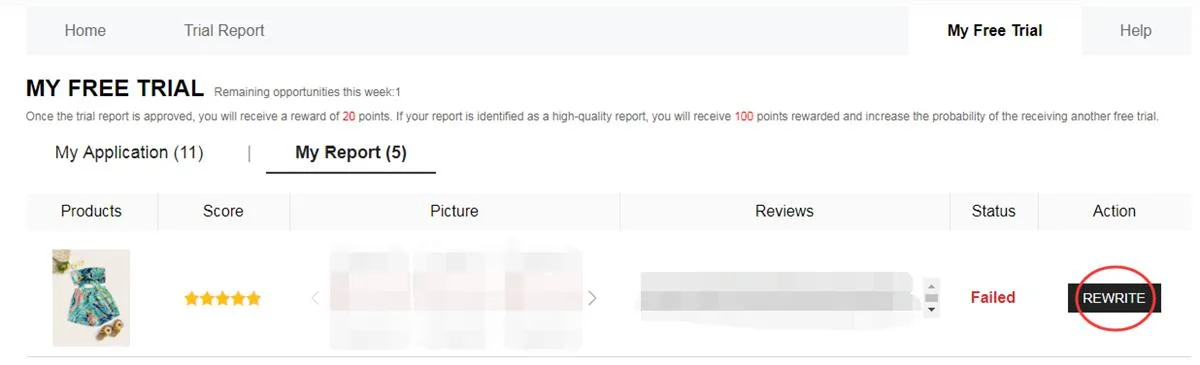
Rewrite, when active: correct the content and send it back for review
Process timeline: from request to review
Phase one: scan live campaigns and shortlist products of interest. Catalog rotation is constant, so an item listed this week can be absent next cycle.
Phase two: evaluation. Shipment is not confirmed at this point; each request hinges on the status your dashboard shows afterward.
Phase three: an approved item ships to your registered address. Arrival opens the testing period, during which multiple product attributes require examination.
Phase four: report submission. Meeting the deadline is necessary but not sufficient: content must be original and useful, with images that faithfully represent the received item.
Which segments can campaigns include?
Stock varies by period; the catalog can draw on several segments in rotation:
- Clothing: apparel such as dresses, tees, blouses, denim, sportswear and outerwear.
- Beauty and care: cosmetics, skincare and items for a regular personal care routine.
- Accessories: handbags, shoes, jewelry, fashion add-ons and related style items.
- Home and organization: cookware, decorative objects, storage solutions and goods for multiple rooms.
Prior rejections have no fixed bearing on future request outcomes.
Every fresh round is an opportunity to audit your data and reapply with correct information.
Review quality: key criteria
A strong report goes beyond a like/dislike verdict. Target concrete observations drawn from real usage:
• Strengths and weaknesses: note both, with specifics.
• Evaluation points: fit, fabric, finishing, comfort and how it really looks.
• Original photos only: adequate lighting, angles that make the item clearly visible.
• Buyer-relevant notes: anything that informs a purchase decision on this product.
Failure points that weaken participation
Quick audit at the close of each step; it prevents frequent problems such as:
❌ Incomplete or outdated core profile fields.
❌ A shipping address that falls beyond the chosen store's coverage area.
❌ Confirming an item before checking size and listing details.
❌ A thin report that omits your actual experience with the product.
❌ Low-quality or unclear images that hide the product.
❌ Exceeding the 10-day maximum window for review submission.
❌ Ignoring an available Rewrite option on a rejected report.
❌ Entering information that misrepresents your real participation details.
Program criteria: summary
• Weekly limit: 3 applications maximum; unused slots never transfer to a later cycle.
• Address criterion: it must sit in the country or region tied to the store used for the request.
• Shipping status: standard delivery is covered, though customs rules and possible charges vary by destination.
• Post-delivery, a set time limit governs completion and submission of the mandatory report.
• Rejected reviews can receive a Rewrite option: edits are allowed before re-evaluation.
• False information or account misuse: grounds for restriction or exclusion from later rounds.
• Participant obligations: execute each stage correctly and submit every required report.
FAQ: Common Questions
Is any fee charged at application?
Free Trial Center requests carry no charge. Submission alone, however, guarantees no selection.
Request volume: what is the weekly maximum?
Limit: 3 products per weekly cycle. Unused options expire; they do not transfer to the following week.
Will one rejection affect later requests?
No. A non-selected request impacts that single opportunity only. Monitor new campaigns and apply again as fresh products go live.
How do I know a review requires correction?
Check the My Report section: Failed status plus a visible Rewrite option means edits and resubmission are possible.
Want a walkthrough of each stage?
Full workflow coverage: navigating the Free Trial Center, tracking applications and writing a compliant review after selection.


